

Topics are a key premium feature in AI Assisted Article Generator. Topics and Article Briefs are simple to run, you can trigger a Topic run on demand or on a schedule, and the editorial settings you choose now shape the article that comes out. Read our post on what changed recently and where AI assistance ends.
Dashboard
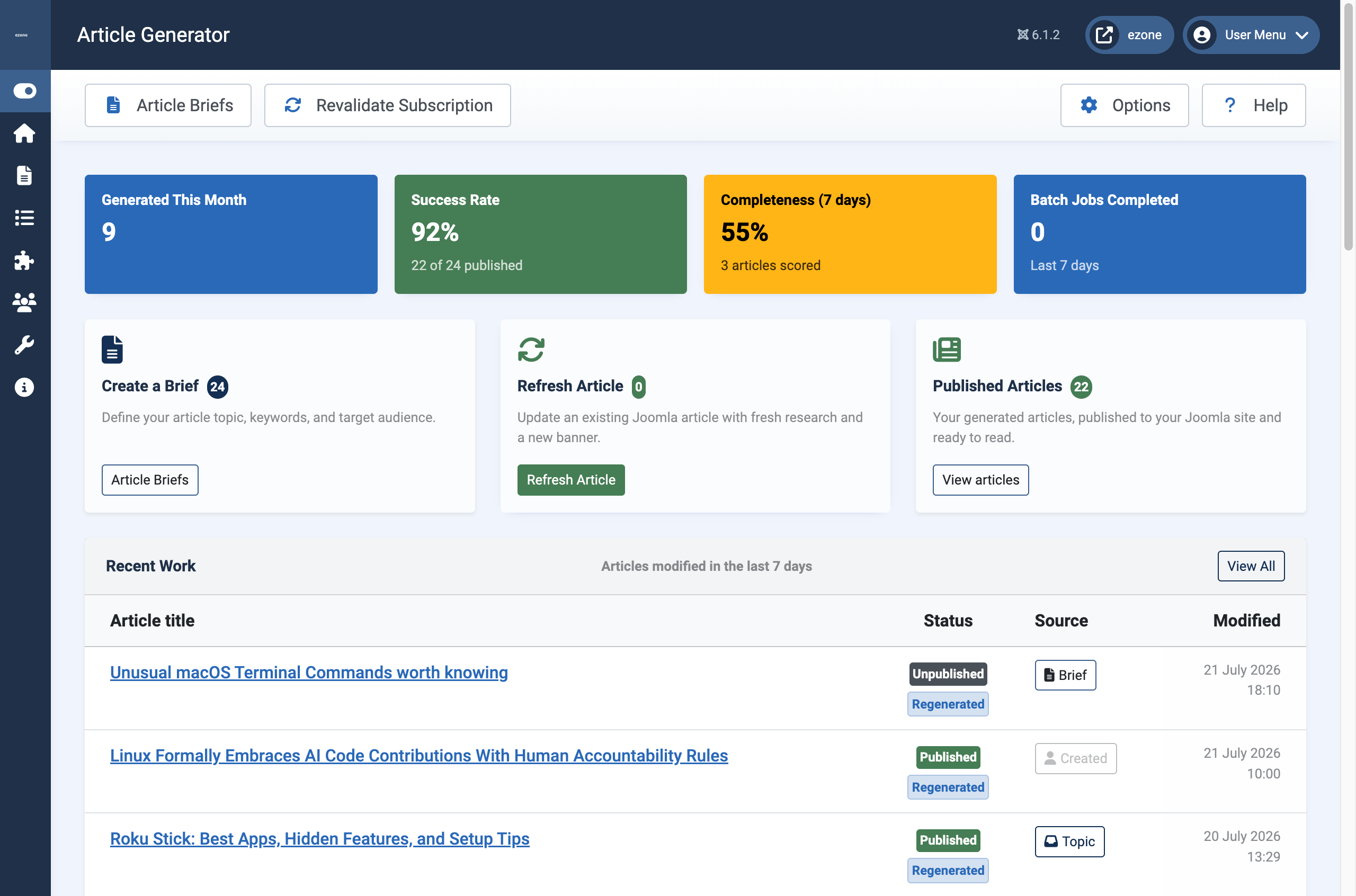
From the Dashboard you can see at a glance how many articles you've generated, their success rate in being published, how well your article content has been scored for completness. You can also quickly Create a new Article brief. And a really nice feature is that you can update an existing Joomla article with fresh research new content and a new banner.
Topics
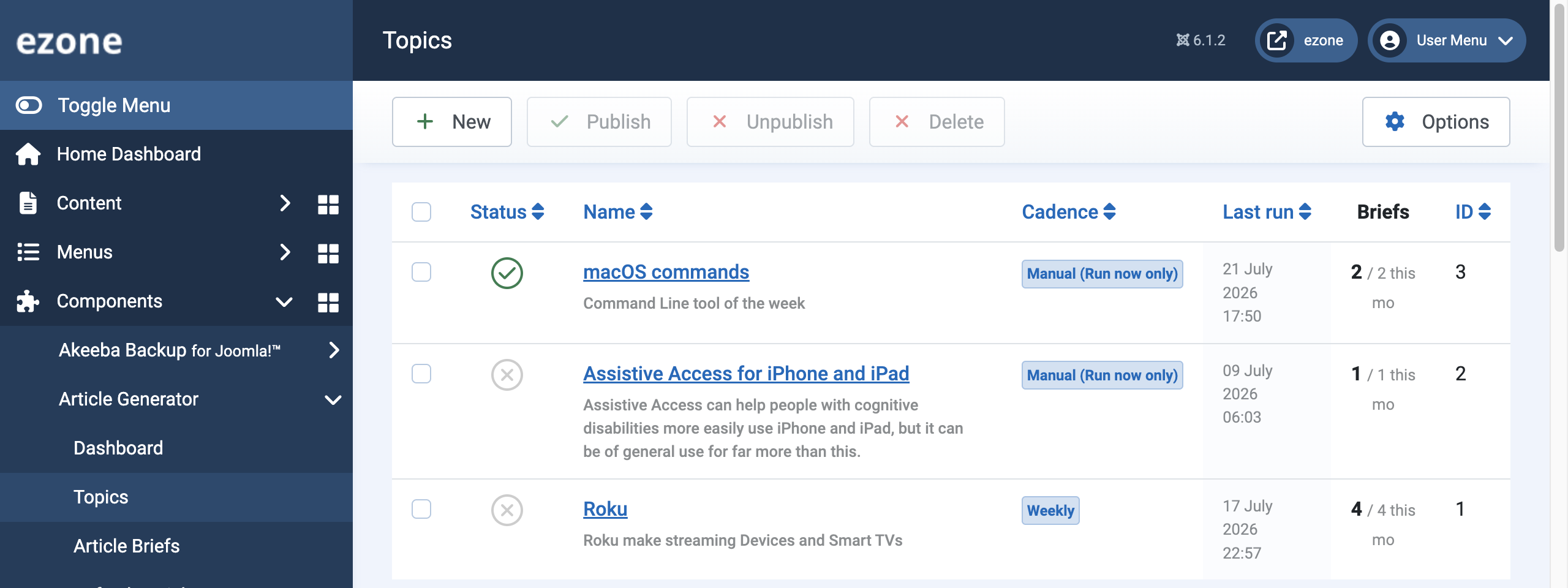
A Topic is a subject you want articles written on, with its own sources and its own cadence. It harvests from the topics, RSS feeds and search queries you point it at and produces a brief, which the article generator then turns into a draft. We've worked hard to improve topic handling this past week.
You can now publish or unpublish a Topic straight from the list, and set its status on a new General tab. Best of all, you can press Run now on the Topic itself to harvest and produce a brief on demand — no more running it opaquely from the scheduled task and hoping. You see the result there and then.
Your editorial settings now shape the article
This is the change we are most pleased with. The tone, reading level and structure you set on a brief are now wired into article generation, so the article actually reflects them rather than defaulting to a house style. Your chosen base heading level is respected throughout, too, so the generated markup slots into your page structure instead of fighting it. In short: the editorial decisions you make up front are the ones that come out the other end.
Simpler, more predictable scheduling
Scheduling used to lean on a fixed time of day, which Joomla's lazy web scheduler cannot hit reliably. This means that if nobody visits the site at the appointed minute, nothing fires. Topics now run purely on elapsed time since their last run: set a Topic to run every so many hours or days, and it goes when that interval is up, whenever the scheduler next wakes. It is simpler to understand and far more predictable in practice.
A Topic set to Manual never fires on its own — it only runs when you press Run now. That makes the on-demand button and the schedule two ends of the same control, rather than two separate mechanisms.
Leaner Article Briefs
Article Briefs have been trimmed tof extra fields. Intro and full-article images have been removed from the brief, because Joomla's own article editor already handles them and does it well; there was no good reason to duplicate that. The images tab is now Inline images, and it keeps the tools that are genuinely the brief's job: pasting your own images and browsing curated Creative-Commons ones, including one-click Add to inline images straight from the image Pinboard of your own uploaded images.
Where AI assistance ends and editorial judgement begins
AI is the means here, not the message. The generator does the mechanical legwork of producing a first draft on a brief. It does not decide what your audience cares about, whether the content is accurate for your domain, or whether the framing is right for your brand. Those decisions stay with the you, the editor. Saving to draft preserves the editorial pass that the AI cannot do for you, and now that your tone, reading level and structure carry through, that draft starts much closer to publishable.
For sites where Topics fits, the value is in turning a content programme from "I will write three articles a month if I find the time" into "I will edit and publish three drafts a month, each one already in my house voice".
Where Topics sits in the tier structure
Topics is a Premium tier feature. It is not in the Trial and it is not in Standard. That is deliberate: Topics is where the article generator turns from a helpful tool into a running content operation, harvesting from topics, RSS feeds and search queries and producing briefs for generation on demand or on a schedule. The Premium tier reflects that ongoing value.
The wider tier structure follows the pattern used across the Multizone extensions catalogue: Trial, Standard, Premium and Enterprise.
Trial gives you the base article generator with a monthly article cap. Enough to write and refresh individual articles, on one Joomla site, and see whether the writing quality suits your brand.
Standard raises the monthly article cap and adds Batch Processing for generating multiple articles in a single job. Still no Topics.
Premium is where Topics arrives, alongside the Advanced Campaign Types (News Beat, New Product Introduction). Priority support included.
Enterprise is unlimited across the numeric caps and adds Premium Support with a dedicated representative.
One thing has left this list rather than joined it: the Content Calendar is being retired from the Article Generator and spun out into a dedicated Content Planner extension since we felt it was better aligned with joomla articles with or without AI Assisted Article Generator. The generator's planning step now hands straight off to Joomla's own article manager, and we will have more to say about Content Planner when it is closer to release.
The full tier comparison with the specific numeric limits (monthly articles, batch sizes, permitted domains) is on the AI Assisted Article Generator detail page. Start with a free trial. Upgrade at any time.
What to do with this post
Start with a free trial. Upgrade at any time.
All of our extensions with subscriptions run a 30-day free trial automatically on install.
Browse the directoryJoomla updates by email
Register for Multizone Joomla updates: roughly weekly when we're busy, less often the rest of the time. Double opt-in via Postmark integration, a new feature in our Verified Forms Joomla component.
RegisterLeave a JED review
If a Multizone extension has been useful to you, please leave a review on the Joomla Extensions Directory. We are starting from zero across the catalogue and reviews compound quietly.
View Multizone on JED