
Cassiopeia is the default template that ships with Joomla 4, 5 amd 6. Cassiopeia Themer is the Multizone extension that gives it a brand identity you can set from the Joomla admin, and then a set of commercial features on top. Recent releases have made the identity side considerably more complete, so today's post covers what it does now, what we have shipped, what the paid tiers add, and when each fits.
What Cassiopeia Themer does
The base extension gives you a visual control panel for Cassiopeia. Background images with sizing and parallax; linear and radial gradient backgrounds for the site header and footer; banner slot placement across the header, below-header and pre-footer positions; a colour and typography editor; and the identity details that used to mean editing template files, including your fonts and your favicon. You configure it in the Joomla admin; the template picks up the changes without CSS overrides to maintain.
Cassiopeia Themer is the most-downloaded extension in the Multizone directory. Joomla site owners seem to converge on this one early: Cassiopeia gives you a clean canvas, Themer gives you the brush.
What we have shipped recently
The last several releases have pulled in one direction: setting a brand identity in the admin, and being able to see it on your own front end before you commit to it.
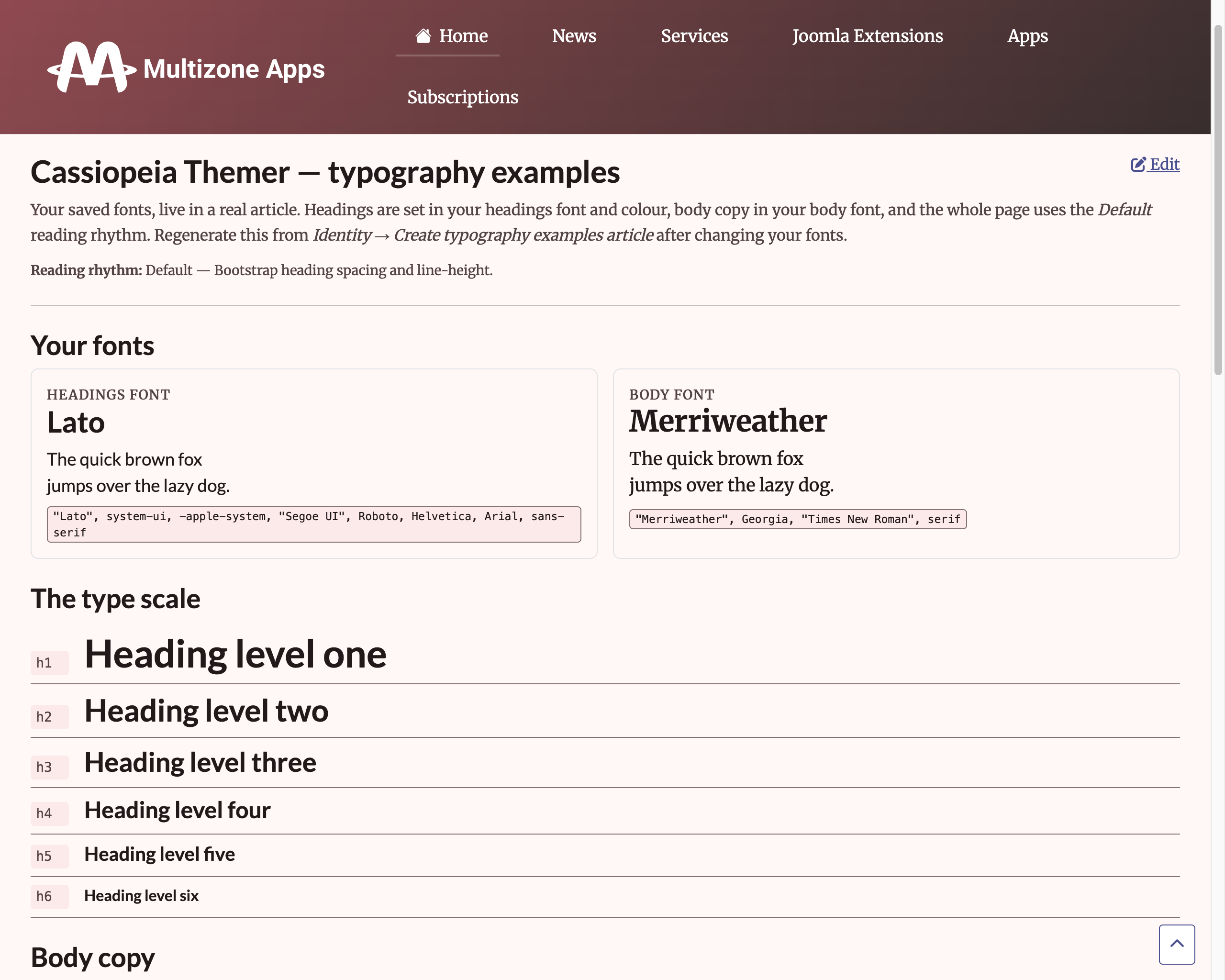
Fonts without template editing. The Identity screen has a search-as-you-type picker above each font field. Start typing and choose from over 1,900 Google Fonts families. Picking one fills in the font stack and switches on font loading for you, so your choice renders on the front end straight away. You can still type a full stack by hand if you are using system or self-hosted fonts. The family list is part of the extension, so browsing it never sends a request to Google, which matters if you are keeping third-party calls off your admin. The Identity preview shows your actual fonts rather than an approximation, with the full heading scale.
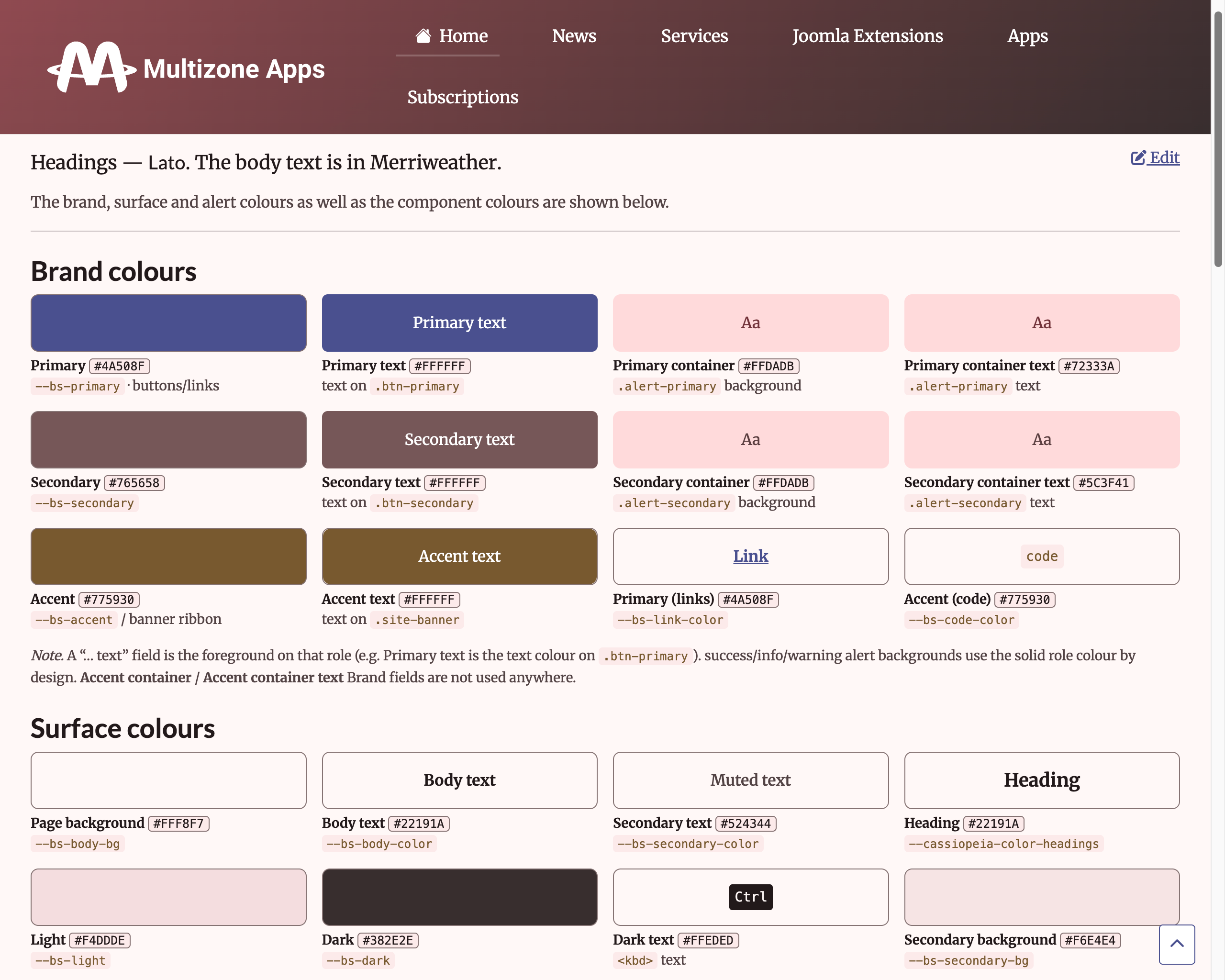
Example articles on your real front end. Themer generates two ready-made Joomla articles that render your brand on your live site. The palette example article labels each component group (button variants, alerts, badges, cards and tables) in your own theme colours. The typography example article shows your heading and body fonts with the full type scale and real body copy. Previews in the admin are useful, but these are real articles on your real template, which is the only honest check, and they double as a quick way to try something out before you commit.
Favicon and icon colour. The favicon's background colour now shows behind your icon on the browser tab, not just as a tint on the mobile address bar. This matters more than it sounds: a transparent single-colour logo, a white glyph for instance, was previously invisible against the tab. An optional icon colour recolours the glyph on top of the background, and the brand-colour quick-pick offers matched pairs from your own palette, each showing both swatches, so one click sets a legible background and icon together with a live preview.
Appearance and presets. Light, dark and auto appearance, gradient presets are derived from your theme, and alert colours are inferred from your palette rather than set by hand.
Home-screen icons on any host. The 180 by 180 icon that iOS and Android use when someone adds your site to their home screen is now generated from your SVG on every save and rendered on your chosen background colour with your icon colour. It used to depend on Imagick, a server image library plenty of hosts do not provide, and on those hosts no icon was produced at all. The Identity preview now shows exactly what will be saved.
One other fix worth highlighting: Ahrefs Web Analytics is now correctly available from the Standard tier as intended, having mistakenly required Premium for a period. If you are on Standard and had concluded Ahrefs was not included, it is, and it works.
What the trial gives you
The trial covers the visual layer:
- Cassiopeia palette & typography editor with live preview,
- Google Fonts load and render with no template editing
- Generate palette and typography example articles as a reference for your brand,
- Favicon from a single SVG for every device and saved web app icon,
- Layout: inline navbar, menu toggler icon, sticky header, container width, spacing, corner radius, shadows,
- Page background image with sizing and parallax,
- Header and footer gradients,
- Banner slots: header, below-header, and pre-footer,
- 1 site
This is enough to reskin a stock Cassiopeia install to the broad strokes of a brand. The trial runs automatically for 30 days on install; the visual features carry on working after the 30 days.
What the paid tiers add
The tier structure follows the pattern used across the Multizone catalogue: Trial, Standard, Premium and Enterprise. The paid tiers add features in three directions: palette import, analytics and monetisation, multi-site.
Standard is everything in the Trial, plus:
- Import a Google Material Theme Builder palette: recolour the whole template in one click,
- Ahrefs Web Analytics (cookieless, no consent banner needed),
- Amazon affiliate link rewriting (auto-rewrite Amazon URLs in article content with your affiliate tag)
- 3 sites
Premium is everything in Standard, plus:
- Google Analytics 4 measurement,
- Google AdSense (auto-ads and manual slot rendering),
- Google Consent Mode v2 with a Consent Management Platform stub (the default-denied consent flow Google Analytics and AdSense need to comply),
- Custom branding,
- Priority support,
- 6 sites
Enterprise is everything in Premium, plus:
- Unlimited sites
- Premium support
The full tier comparison is on the Cassiopeia Themer detail page. Start with a free trial. Upgrade at any time.
When each tier fits
Trial and Standard fit anyone running Cassiopeia who wants visual customisation without CSS. Standard specifically fits site owners who want analytics that doesn't require a consent banner, and content sites monetising via Amazon affiliate links.
Premium fits sites that make money from Google AdSense: auto-ads and manual slot rendering, Google Analytics 4 support and the compliant consent flow together mean the site is ready to accept AdSense without additional plumbing.
Enterprise fits agencies and multi-site owners running more than one Cassiopeia-based site.
Cassiopeia Themer does not theme other Joomla templates. It is specifically a Cassiopeia extension.
What to do with this post
Start with a free trial. Upgrade at any time.
All of our extensions with subscriptions run a 30-day free trial automatically on install.
Browse the directoryJoomla updates by email
Register for Multizone Joomla updates: roughly weekly when we're busy, less often the rest of the time. Double opt-in via Postmark integration, a new feature in our Verified Forms Joomla component.
RegisterLeave a JED review
If a Multizone extension has been useful to you, please leave a review on the Joomla Extensions Directory. We are starting from zero across the catalogue and reviews compound quietly.
View Multizone on JED