
Content Amplifier turns articles you publish in Joomla into scheduled social posts across LinkedIn, Facebook, Instagram, Threads, Bluesky and Mastodon, without leaving Joomla administrator. It reads a piece you have already written, drafts a post shaped for each network, hands the draft to you to edit, then posts it now or on a schedule. It is the seventh extension in the Multizone directory, it reached its initial release this month, and it earns this series an eighth week.
What Content Amplifier does
Most social schedulers start with an empty box. You write the post, then paste it into each network in turn, adjusting as you go for length and for what that audience expects. The writing is rarely the hard part. The repetition and the scheduling are what quietly stop getting done, usually about three weeks after you resolve to take social seriously.
Content Amplifier starts from the other end, with something you have already made. Point it at a published Joomla article and it drafts a post per network from the article itself, shaped for that network, with a live character count as you edit. Everything happens inside the Joomla administrator, using your own accounts and your own AI provider key.
There are two ways to work: quick posts, and campaigns.
Quick posts: the everyday workflow
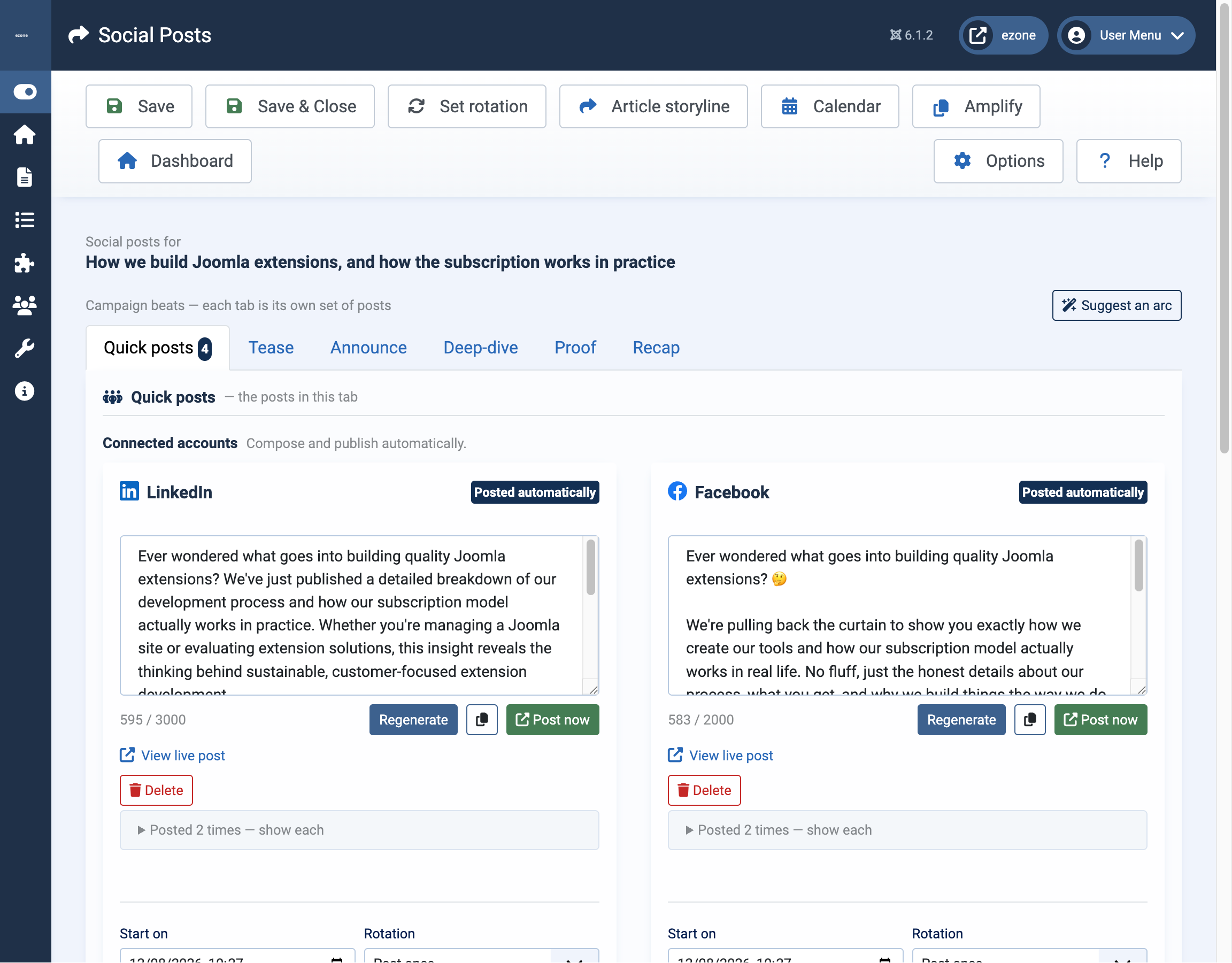
A quick post is one post per network for one article. Open the quick posts screen for an article, from the calendar, from its storyline, or from the Amplify list, and you get a card per network. Connected accounts, which can publish automatically, sit at the top. Everything else drops into a collapsed Copy & paste group.
For each network: press Generate, read what comes back, edit it, then use Copy to take the text away, Post now to publish immediately, or set a start time to queue it. The editing step is expected rather than a fallback. It is your words that go out.
The copy and paste group matters more than it sounds. A network you have not connected, or cannot connect, is not excluded from the workflow. Content Amplifier still drafts copy for it and you paste it in yourself. You get the drafting benefit on every network from the first day, before working through any sign-in flows.
Campaigns and the beat bar
On a paid plan the quick posts screen grows a row of tabs across the top, the beat bar. The first tab is the everyday quick post screen you already know. The others are the beats of a campaign: Tease, Announce, Deep-dive, Proof and Recap by default, each its own set of posts in a panel beneath the tab.
One article, one arc. Press Suggest an arc and Content Amplifier proposes a sequence of beats and dates for that article. Work tab by tab from there, generating and editing posts per network exactly as you would for a quick post, and use Schedule this beat to set a single date for every channel in that beat at once. A small badge on each tab counts the channels that already have a post, so the campaign visibly fills out as you build it. Clear arc removes the suggestion and leaves any posts you have already created alone.
The point of the beat structure is to stop a launch being one post that vanishes in an afternoon. Same article, five angles, spread across days.

Repeating promotion, and the calendar around it
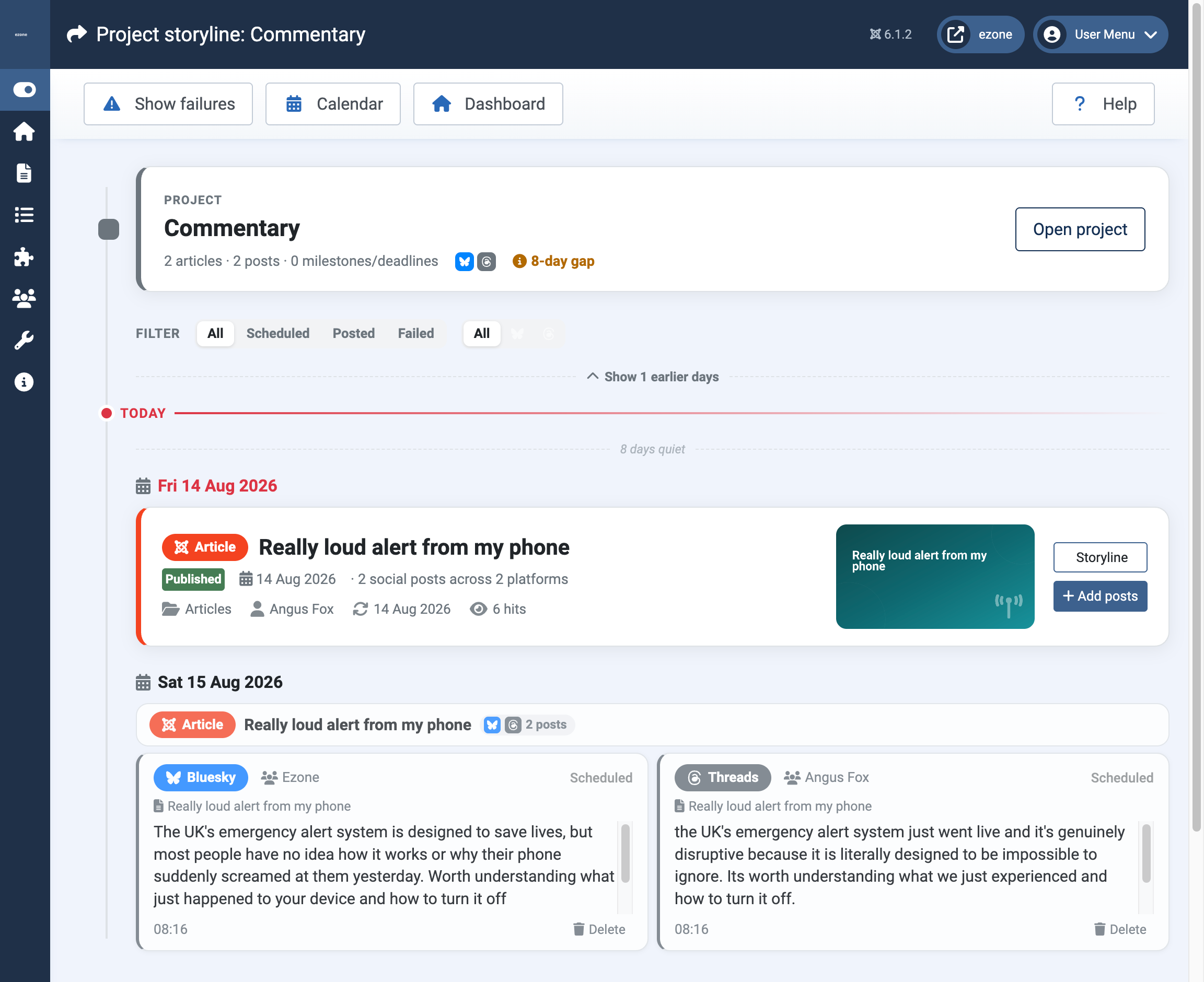
A good article does not stop being good the week after you published it. On the schedule for any post you can choose a repeating rhythm and a horizon: a number of repeats, an end date, until an event, or ongoing. An evergreen piece then keeps reaching people who were not looking the first time. You can pause it, stop future occurrences, or delete a single occurrence, all from the storyline.
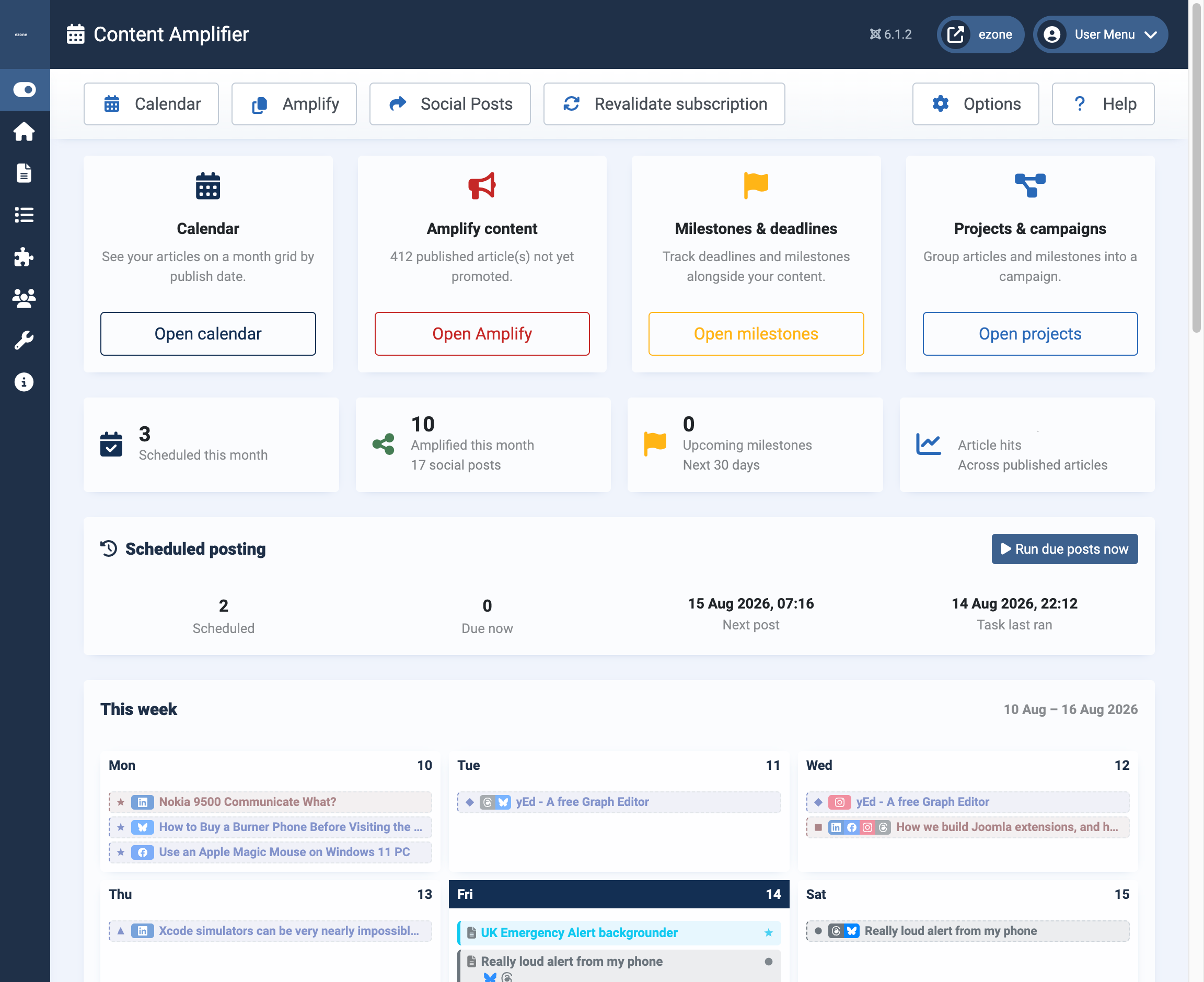
Around all of this sits an editorial calendar in day, week, month and quarter views, covering your articles and their social posts together. The dashboard summarises the month and the week ahead. Amplify is the to-do list: articles that are published but not yet promoted, plus the ones coming up. A storyline shows every post for a single article in order, with status and links. The social posts list shows every post across every article in one searchable, filterable place, and a delete there updates the storylines and the calendar with it.
Your keys, your accounts
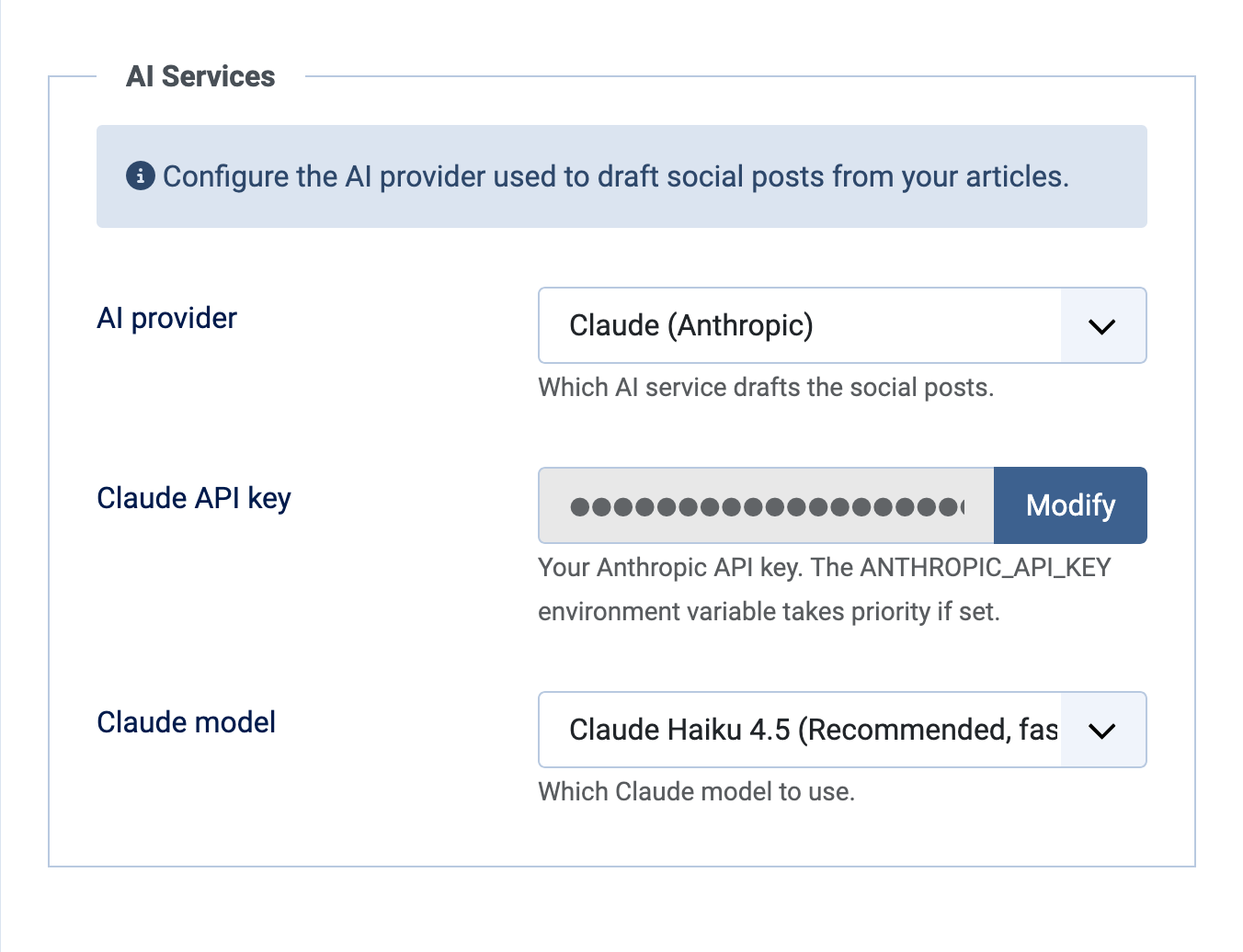
Content Amplifier does not resell AI usage and does not route your posts through a Multizone service. You bring an API key from OpenAI or Anthropic for the drafting, and you connect your own social accounts. Your content and your credentials stay on your site, and your AI costs are whatever your provider charges you, billed to you directly.
This is a design decision rather than a missing feature. Scheduling tools that sit in the middle of the pipe accumulate your content, your posting history and your access tokens as a matter of course. There is no good reason a Joomla site owner should have to accept that in order to schedule a post from an article they wrote on their own site.
Written to read like a person wrote it
The generated copy deliberately avoids clickbait openings, hype words, ALL-CAPS and emoji pile-ups. That is baked into the prompts, and it is most of the difference between a feed that reads as though someone runs it and one that reads as though something runs it.
On Standard and above you can set a custom prompt per channel, under Channels, edit a channel, Post content. It is worth doing once for any account with a distinct tone, because a company page and a personal profile should not sound the same.
Three habits keep the output good. Read the draft before it goes out and put at least one line of it into your own words. Let a campaign breathe over days rather than firing every beat together. And set the per-channel prompt once for the accounts that need it, rather than editing the same thing out of every draft for the next year.
Setting it up
Two steps and a caveat.
Step one, the AI provider. Content Amplifier, then Options. Choose your provider, paste your API key, save. Until a key is present the Generate buttons stay unavailable and the screen tells you why.
Step two, a channel. Social Media, then Channels. Add a channel for each account you want to post to and give it a label. Threads, Facebook, Instagram and LinkedIn connect through a sign-in and authorisation. Bluesky and Mastodon use an app password or an access token that you paste in. Facebook and Instagram share one Meta setup, which has a guide of its own.
The caveat. Automatic posting on a schedule runs through Joomla's own Scheduled Tasks. Enable the Content Amplifier publishing task under System, Manage, Scheduled Tasks, and make sure the site has a cron job, a web-cron or lazy scheduling turned on. This is comfortably the most common reason a scheduled post does not appear. Post now works without any of it.
One further word of caution, on Mastodon. Instance moderators can be strict about automation, posting frequency and promotion, and are quick to suspend accounts over it. Read the content policy of your instance before you point a scheduler at it. Running your own instance is always an option.
What the trial gives you
The trial covers up to three networks, one account on each, and twenty articles amplified a month. Quick posts work in full: generate, edit, post now, schedule, or copy and paste. Campaigns and per-channel prompts are not in the trial. It is enough to connect the networks that matter most to you, run a month of real posting, and find out whether the workflow fits the way you actually publish. The trial runs automatically for 30 days on install, as it does across the catalogue.
What the paid tiers add
The tier structure follows the pattern used across the Multizone catalogue: Trial, Standard, Premium and Enterprise.
| Feature | Trial | Standard | Premium | Enterprise |
|---|---|---|---|---|
| Networks LinkedIn, Facebook, Instagram, Threads, Bluesky, Mastodon |
Up to 3 | All six | All six | All six |
| Accounts per network Separate accounts you can post to on the same network |
1 | 1 | 3 | Unlimited |
| Articles amplified per month Articles you can generate social posts from |
20 | 200 | Unlimited | Unlimited |
| Campaigns and per-channel prompts The beat bar, plus a custom prompt per channel |
No | Yes | Yes | Yes |
| LinkedIn Company Page Posting to a company page rather than a personal profile |
No | No | No | Yes |
Standard is the tier that changes how the extension feels. It opens all six networks and turns on campaigns and the per-channel prompt, which together move it from a scheduler into something you plan with.
Premium is for anyone running more than one account on a network, at three per network, and it removes the monthly cap on articles.
Enterprise is unlimited accounts per network, and it is the tier that reaches a LinkedIn Company Page. If posting to a company page is the reason you are reading this, that is worth knowing now rather than after you have set everything up.
Changing plan never disables channels you have already connected. The limits apply when you add new ones.
The full tier comparison is on the Content Amplifier detail page. Start with a free trial. Upgrade at any time.
What to do with this post
Start with a free trial. Upgrade at any time.
All of our extensions with subscriptions run a 30-day free trial automatically on install.
Browse the directoryJoomla updates by email
Register for Multizone Joomla updates: roughly weekly when we're busy, less often the rest of the time. Double opt-in via Postmark integration, a new feature in our Verified Forms Joomla component.
RegisterLeave a JED review
If a Multizone extension has been useful to you, please leave a review on the Joomla Extensions Directory. We are starting from zero across the catalogue and reviews compound quietly.
View Multizone on JED